FACTORY SYSTEMS PC-N4-15-LCD-TS Plc Modules
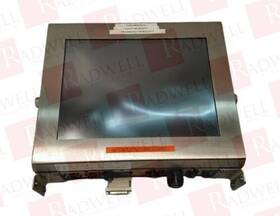
( Brand: Factory Systems ), ( Manufacturer Part Number: PC-N4-15-LCD-TS ), ( Part Type: Module )
Review FACTORY SYSTEMS Pcn415lcdts Used
The **PC-N4-15-LCD-TS (PCN415LCDTS)** is a robust, all-in-one industrial-grade touchscreen computer designed for demanding environments where reliability, durability, and performance are paramount. This compact yet powerful device integrates a **15-inch wide-viewing angle LCD display** with a **10-point capacitive touchscreen**, ensuring intuitive interaction even in bright or low-light conditions. Built with a **fanless, passive cooling system**, the PCN415LCDTS operates silently and efficiently, eliminating the risk of overheating while maintaining optimal performance in continuous operation. Its **ruggedized construction** features a reinforced metal chassis with **IP65-rated protection**, making it resistant to dust, water splashes, and accidental impacts ideal for outdoor kiosks, retail displays, manufacturing control panels, or public information terminals.
Under the hood, the PC-N4-15-LCD-TS is powered by a **high-performance Intel Celeron or Pentium processor**, paired with sufficient RAM and storage options to handle multitasking applications, embedded systems, or custom software solutions. The system supports **multiple operating systems**, including Windows 10/11 IoT Enterprise, Linux, and Android, providing flexibility for diverse industrial, commercial, or educational use cases. Its **expansive I/O connectivity** includes **USB 3.0/2.0 ports, serial (RS-232/485) interfaces, VGA/DVI/HDMI outputs, and Ethernet**, enabling seamless integration with peripherals, sensors, or networked systems. Additionally, the built-in **Wi-Fi and Bluetooth modules** facilitate wireless communication, further enhancing its versatility for applications requiring remote monitoring or mobile connectivity.
The **15-inch LCD touchscreen** delivers crisp, high-resolution visuals with **anti-glare and wide-viewing angle technology**, ensuring clarity from any angle while reducing eye strain during prolonged use. The **10-point capacitive touch interface** supports multi-touch gestures, making navigation and data entry effortless, whether for point-of-sale systems, digital signage, or interactive kiosks. The device also features **low-power consumption**, extending operational life in battery-powered or off-grid applications, while its **hot-swappable components** allow for easy maintenance without downtime. With a **compact yet sturdy form factor**, the PCN415LCDTS can be mounted vertically or horizontally, adapting to various installation constraints while maintaining optimal airflow and accessibility.
Designed for **24/7 reliability**, the PC-N4-15-LCD-TS incorporates **redundant power inputs, overvoltage protection, and fail-safe mechanisms** to prevent data loss or system failure under adverse conditions. Its **low-power standby mode** conserves energy when not in use, while the **silent operation** ensures minimal disruption in noise-sensitive environments. Whether deployed in **retail, healthcare, transportation, or industrial automation**, this all-in-one touchscreen computer offers a seamless blend of **performance, durability, and user-friendly functionality**, making it a versatile solution for modern digital applications.
The **PC-N4-15-LCD-TS (PCN415LCDTS)** is a compact, all-in-one business-grade PC designed for office use, featuring a 15.6-inch LCD touchscreen display, an Intel Celeron N4100 processor, 4GB of RAM, and 64GB of eMMC storage. Below is a detailed breakdown of its pros and cons, followed by a conclusion and recommendation.
---
### **Pros**
1. **Compact and Space-Saving Design**
The all-in-one form factor eliminates the need for a separate monitor, keyboard, and mouse setup, making it ideal for small offices, shared workspaces, or environments where desk space is limited. Its lightweight and slim profile also make it portable for occasional use in meetings or presentations.
2. **Touchscreen Functionality**
The integrated touchscreen adds versatility for tasks such as digital signage, interactive presentations, or touch-based applications (e.g., note-taking apps, basic design tools). This feature can be particularly useful in retail, education, or customer-facing roles where interactivity is beneficial.
3. **Built-in Webcam and Microphone**
The inclusion of a front-facing webcam and microphone simplifies video conferencing, remote work, or virtual meetings without requiring additional peripherals. This is convenient for small businesses or home offices where setup efficiency is valued.
4. **Low Power Consumption**
The Intel Celeron N4100 processor is energy-efficient, which can reduce electricity costs compared to more powerful systems. This makes it suitable for organizations looking to minimize operational expenses or for use in battery-powered scenarios (though this model is not battery-equipped).
5. **Reliability and Durability**
Business-grade PCs like this one are typically built to withstand frequent use and may include features such as spill-resistant keyboards or reinforced chassis. The lack of moving parts (e.g., no optical drive) reduces the risk of mechanical failure, contributing to long-term reliability.
6. **Affordability**
The PCN415LCDTS is priced competitively for its category, making it accessible for small businesses, startups, or budget-conscious individuals. Its low cost of ownership can be appealing for non-critical applications where high performance is not a priority.
7. **Easy Setup and Maintenance**
As an all-in-one unit, there are fewer components to troubleshoot or replace. The lack of external ports (beyond USB and HDMI) simplifies connectivity for basic tasks, though this can also be a limitation in some scenarios.
8. **Sufficient for Basic Tasks**
The 4GB of RAM and 64GB of eMMC storage are adequate for everyday tasks such as web browsing, document editing (e.g., Microsoft Word or Google Docs), email, and light multimedia consumption. It can handle basic office software like accounting programs (e.g., QuickBooks) or customer relationship management (CRM) tools without significant lag.
9. **No Moving Parts (eMMC Storage)**
Solid-state eMMC storage is more durable than traditional HDDs and offers faster boot times compared to older systems. While it lacks the expandability of an SSD or HDD, it reduces the risk of data loss due to mechanical failure.
10. **Pre-Installed Operating System**
Many business-grade PCs come with a pre-installed OS (often Windows 10 or 11 Pro), which simplifies the setup process for end-users. This can be particularly useful for IT administrators deploying multiple units in an organization.
---
### **Cons**
1. **Limited Performance**
The Intel Celeron N4100 is a low-power processor with dual cores and a base clock speed of 1.1 GHz, which can struggle with multitasking or resource-intensive applications. Tasks such as video editing, 3D rendering, or running multiple virtual machines will be impractical. Even for office work, heavy multitasking (e.g., running several browser tabs with complex extensions) may result in slowdowns.
2. **Insufficient RAM for Modern Demands**
4GB of RAM is the minimum recommended for most modern operating systems and software. While it may suffice for basic tasks, it can lead to performance bottlenecks when running multiple applications simultaneously (e.g., web browsing email office software a virtual machine). Upgrading RAM is not possible on this model.
3. **Small and Slow Storage (eMMC)**
The 64GB eMMC storage is extremely limited by today s standards. While it may be enough for storing a few documents or basic software, it cannot accommodate large files (e.g., high-resolution images, videos, or extensive software libraries). Users will need to rely on external storage (USB drives, cloud services) for most data, which can be inconvenient. Upgrading storage is not an option.
4. **No Upgradeability**
Unlike traditional desktops, this all-in-one PC does not allow for RAM or storage upgrades. This limits its longevity, as users cannot future-proof the system by adding more memory or larger storage when needed.
5. **Limited Ports and Connectivity**
The PC typically includes a few USB ports (likely 2-3 USB 2.0/3.0), an HDMI output, and possibly a headphone jack. There is no Ethernet port (requiring a USB adapter for wired connections), and wireless connectivity may be limited to basic Wi-Fi standards (e.g., 802.11ac). This can be restrictive for users who need reliable wired connections or advanced networking features.
6. **Display Limitations**
The 15.6-inch LCD touchscreen may not offer high resolution (likely 1366x768 or similar), which can result in pixelated text or images when compared to modern monitors. The touchscreen, while useful, may also introduce occasional lag or inaccuracies depending on the application.
7. **No Optical Drive**
The absence of a DVD/CD drive means users cannot install software from physical media or create backups from optical discs. This can be inconvenient for legacy software or offline installations.
8. **Potential Overheating Risks**
Due to its compact design and low-power processor, the PC may not have robust cooling mechanisms. In poorly ventilated environments, overheating could lead to throttling or reduced performance over time.
9. **Lack of Advanced Security Features**
While business-grade PCs often include basic security features, this model may not offer advanced protections such as TPM 2.0, hardware-based encryption, or enterprise-grade antivirus integration. Organizations with strict security requirements may need to supplement the system with additional software.
10. **Software Compatibility Issues**
Some modern applications, especially those requiring significant system resources (e.g., advanced CAD software, certain video editing tools, or virtualization platforms), may not run smoothly or at all on this hardware. Users should thoroughly check software compatibility before purchasing.
11. **No Dedicated Graphics**
The integrated Intel UHD Graphics 600 will handle basic graphics tasks (e.g., presentations, web browsing) but cannot render high-end graphics or support multiple monitors. Gamers or designers will need a more powerful system.
12. **Potential for Outdated Firmware**
Business-grade PCs may not receive frequent firmware or driver updates, which could lead to compatibility issues with newer software or security vulnerabilities over time.
---
### **Conclusion**
The **PC-N4-15-LCD-TS (PCN415LCDTS)** is a practical choice for users who prioritize affordability, compactness, and basic functionality over performance. It excels in environments where simplicity, portability, and touchscreen interactivity are valued such as small offices, retail kiosks, or educational settings for non-technical tasks. However, its limitations in RAM, storage, processing power, and upgradeability make it unsuitable for demanding workloads, multitasking, or future-proofing.
For users who require only essential office tasks (e.g., word processing, email, web browsing, or light multimedia), this PC offers a cost-effective and hassle-free solution. In contrast, those needing to run resource-heavy applications, multitask extensively, or expand the system s capabilities should consider a more powerful desktop or laptop with upgradeable components.
---
### **Recommendation**
- **Buy the PCN415LCDTS if:**- You need a budget-friendly, all-in-one PC for basic office tasks (e.g., typing, web browsing, presentations).
- You require a touchscreen for interactive applications or digital signage in a controlled environment.
- Space is limited, and you prefer a compact, portable setup without external peripherals.
- You are willing to rely on external storage (cloud or USB drives) for data due to the limited 64GB eMMC.
- The system will not be used for multitasking, gaming, or advanced software.
- **Avoid the PCN415LCDTS if:**- You need to run demanding applications (e.g., video editing, CAD, virtualization, or multiple browser tabs with extensions).
- You require upgradeable RAM or storage for future needs.
- You need high-resolution displays, multiple monitors, or dedicated graphics.
- You rely on wired Ethernet connections (will need a USB adapter).
- You work with large files (e.g., high-resolution images, videos) that cannot be stored externally.
- You prioritize long-term performance and plan to use the PC for several years without significant upgrades.
- **Alternatives to Consider:**- **For basic office use with better performance:** A **refurbished or budget desktop** with at least 8GB RAM
Details:
FACTORY SYSTEMS PC-N4-15-LCD-TS / PCN415LCDTS USED MODULE, 115V, 7.5AMP 4/63. Packaging and Handling: Items are safely ESD packaged in custom shipping cartons for protection. All products are guaranteed to be working but may show signs of use if purchasing a used product. Sells new and surplus product develops channels to purchase such.
Call to use a shipping service other than the ones listed.
part #: pcn415lcd price
- $208.64
specifications sensoindustria:
- brand: Factory Systems
- mpn: Pc-n4-15-lcd-ts
- part type: Module
offer sensoindustria:
- quantity: 1
- options: Ship-to-home
- started: April 14, 2026
- sold: 0
- availability: In Stock
seller sensoindustria:
- # reviews: 1993 44
- city: 1 Millennium Dr, Willingboro, NJ 08046
- rating: 99.6%
shipping sensoindustria:
- transit: 29-34 Days
- class: Standard
- type: Fixed
- service: Standard
- cost: $12.90
general sensoindustria:
- PLCs HMIs > PLC Peripheral Modules > PLC Input Output Modules
- condition: Used
returns sensoindustria:
- time: 30 Days
- policy: Returns Accepted
- method: Money back
- paid by: Buyer
payments sensoindustria:
- other
- wallet: Paypal
- credit card: Diners-club
Factory Systems PC-N4-15-LCD Is Similar To:
- 5000-5b Link Systems Pc Board Used (42.9% similar) Link Systems 5000-5B pc board used this item is and in working condition...(April 6th, 2018)
- Fenwal Protection Systems 76-100004-001 Utc Fire And Security Company 76100004001 Used (39.1% similar) Pulled from a kidder system which I had repurposed the enclosure and no longer need fully functional components. This item has been previously owned and well-maintained. The model number, 76-100004-001, is clearly indicated for easy identification. This utility module is designed for use with ...(November 18th, 2024)
- Fisher-rosemount Systems Emerson 32b7638x132 Fisher-rosemount Fiber Optic Interface Used Ump (26.4% similar) Shipped with USPS ground advantage. Condition is used. Fisher-rose mount Emerson 32B7638X132 fiber optic interface used ump...(March 29th, 2025)
- Rockford Systems Ftl-061 Ftl061 Used (50% similar) All products are guaranteed to be working but may show signs of use if purchasing a used product. Call to use a shipping service other than the ones listed. Packaging and handling: items are safely eds packaged in custom shipping cartons for protection. Sells new and surplus product develops ...(April 9th, 2025)
- Far Systems Rio3216d-sp b Rio3216dspb Used (57.4% similar) Call to use a shipping service other than the ones listed. Far Systems RIO3216D-SP/B / RIO3216DSPB used discontinued by manufacturer, i/o module, 32 digital inputs, 16 outputs, led indication, din rail mount. Sells new and surplus product develops channels to purchase such. Packaging and handling: ...(April 30th, 2025)
- Leukhardt Systems Mix2-2 204.04 Mix2220404 Used (44.4% similar) Lockheed Systems MIX2-2 204.04 / MIX2220404 used discontinued by manufacturer, pc board, Sep mix module, 48-PIN connection. All products are guaranteed to be working but may show signs of use if purchasing a used product. Packaging and handling: items are safely eds packaged in custom shipping ...(June 18th, 2025)
- Leukhardt Systems Mix2-2 204.03 Mix2220403 Used (44.4% similar) Lockheed Systems MIX2-2 204.03 / MIX2220403 used discontinued by manufacturer, pc board, Sep mix module, 48-PIN connection. All products are guaranteed to be working but may show signs of use if purchasing a used product. Packaging and handling: items are safely eds packaged in custom shipping ...(June 18th, 2025)
- Leukhardt Systems Bdc-2-1 Bdc21 Used (54.5% similar) All products are guaranteed to be working but may show signs of use if purchasing a used product. Sells new and surplus product develops channels to purchase such. Call to use a shipping service other than the ones listed. Packaging and handling: items are safely eds packaged in custom shipping ...(June 19th, 2025)
- Gould Instrument Systems Inc Cl-412811 Cl412811 Used (46.2% similar) Packaging and handling: items are safely eds packaged in custom shipping cartons for protection. Sells new and surplus product develops channels to purchase such. Call to use a shipping service other than the ones listed. All products are guaranteed to be working but may show signs of use if ...(July 10th, 2025)
- Fenwal Protection Systems 74-800013-001 Kidde-fenwal Llc 74800013001 Used (48% similar) Packaging and handling: items are safely eds packaged in custom shipping cartons for protection. Sells new and surplus product develops channels to purchase such. All products are guaranteed to be working but may show signs of use if purchasing a used product. Call to use a shipping service other ...(August 19th, 2025)
- Dis Dm6010p Danish Interpretation Systems Dm 6010p Delegate Microphone No Accessories Used (31.4% similar) Danish interpretation Systems Dem 6010P delegate microphone no accessories used...(November 20th, 2025)
