HEWLETT PACKARD COMPUTER M1041A Plc Modules
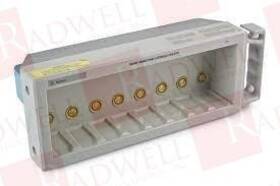
( Brand: Hewlett Packard Computer ), ( Manufacturer Part Number: M1041A ), ( Part Type: Module )
Review HEWLETT PACKARD COMPUTER Used
The **Hewlett Packard (HP) M1041A** is a high-performance, compact, and versatile **1U rack-mount server** designed to deliver robust computing power for demanding enterprise, data center, and small-to-medium business environments. Engineered with reliability and scalability in mind, this server stands out as a cost-effective solution for applications requiring efficient processing, storage, and connectivity. Built on HP s proven ProLiant platform, the M1041A combines cutting-edge hardware with enterprise-grade features, making it an ideal choice for workloads such as virtualization, database management, web hosting, and general-purpose computing.
At its core, the M1041A features a **dual-core or quad-core Intel Xeon processor** (depending on the model), delivering strong single-threaded and multi-threaded performance to handle resource-intensive tasks with ease. The server supports up to **16GB of DDR3 ECC memory**, ensuring data integrity and stability while allowing for seamless multitasking and high-performance operations. With **two hot-plug 3.5-inch SATA hard drive bays** (expandable via optional backplane modules), the M1041A offers flexible storage configurations, accommodating a mix of HDDs and SSDs for optimized performance and redundancy. Additionally, it includes **two PCIe slots** (one x8 and one x4), enabling the integration of high-speed network adapters, RAID controllers, or other expansion cards to further enhance functionality.
Designed for ease of management, the M1041A incorporates **HP s iLO (Integrated Lights-Out) Standard**, a remote management solution that allows administrators to monitor, diagnose, and troubleshoot the server remotely via a web browser. This feature ensures minimal downtime and simplifies IT operations, particularly in distributed or remote data center environments. The server also supports **HP s Smart Start and Insight Control** software, providing automated deployment, configuration, and proactive system monitoring to maintain peak performance. With a **low-power consumption profile** (typically under 100W in idle mode), the M1041A is not only energy-efficient but also well-suited for environmentally conscious data centers.
Security is a key consideration in the M1041A s design, featuring **TPM (Trusted Platform Module) support** for secure boot and encryption, as well as **hardware-based intrusion detection** to prevent unauthorized access. The server s **1U form factor** allows for dense deployment in standard rack environments, maximizing space efficiency while maintaining accessibility for maintenance. Whether deployed as a standalone unit or integrated into a larger infrastructure, the HP M1041A offers a balanced combination of performance, reliability, and manageability, making it a dependable choice for organizations seeking a high-value, enterprise-class server solution.
### **Pros and Cons of buying a HP M1041A Printer**
#### **Pros**
1. **Reliability and Durability** The HP M1041A is a well-regarded laser printer known for its robust build quality and long-term performance. It is designed for heavy-duty use, making it suitable for office environments with high print volumes.
2. **High Print Speed** With a print speed of up to **40 pages per minute (ppm)**, this printer efficiently handles large volumes of documents, reducing wait times in busy workplaces.
3. **Cost-Effective for Bulk Printing** The printer uses **HP LaserJet Pro M1041a toner cartridges**, which are relatively affordable compared to some competitors. The yield per cartridge is sufficient for moderate to high usage, helping to lower long-term printing costs.
4. **Low Maintenance Requirements** Unlike inkjet printers, laser printers like the M1041A require less frequent maintenance. The toner system is durable, and parts like the drum and fuser are designed to last for thousands of pages.
5. **Compact and Space-Efficient** The printer has a **small footprint**, making it ideal for offices with limited desk space. It fits well in tight work environments without sacrificing performance.
6. **Wireless and Network Connectivity** The M1041A supports **Wi-Fi, Ethernet, and USB connectivity**, allowing multiple users to print from laptops, desktops, and mobile devices. This makes it versatile for shared office setups.
7. **Energy Efficiency** HP has designed this printer with energy-saving features, including automatic power-saving modes when idle. This helps reduce electricity consumption, lowering operational costs.
8. **Good Print Quality** The laser printing technology produces **sharp, professional-grade text and graphics**, making it suitable for contracts, reports, and other formal documents.
9. **Durable Toner System** The printer uses **HP s reliable toner cartridge system**, which minimizes toner waste and ensures consistent print quality over time.
10. **Compatibility with HP s Ecosystem** If your office already uses other HP printers or devices, the M1041A integrates smoothly with HP s software and support systems.
---
#### **Cons**
1. **Higher Upfront Cost** Compared to some basic inkjet or entry-level laser printers, the HP M1041A has a **moderate initial purchase price**, which may be a barrier for small businesses or home offices on a tight budget.
2. **Toner Costs Can Add Up Over Time** While the initial toner cartridges are reasonably priced, **replacement toner cartridges (especially third-party ones) can be expensive** if used frequently. HP s official cartridges are more costly than generic alternatives, which may not always match the quality.
3. **Limited Duplex Printing Capability** The **M1041a does not have automatic duplex printing (duplexing)** as a standard feature. Users must manually flip pages for double-sided printing, which can be inconvenient for large print jobs.
4. **No ADF (Automatic Document Feeder) in Base Model** The standard M1041a lacks an **ADF**, meaning it cannot scan or copy multi-page documents automatically. This may require additional accessories if scanning is a frequent need.
5. **Paper Handling Limitations** While it supports **standard letter and A4 sizes**, it may struggle with **thicker or specialty papers** (e.g., cardstock, envelopes) without adjustments. Some users report occasional paper jams with non-standard paper types.
6. **No Touchscreen or Advanced Features** Unlike newer HP models, the M1041a has a **basic control panel with no touchscreen**. Navigation is done via physical buttons, which may feel outdated compared to modern printers with intuitive interfaces.
7. **Limited Mobile Printing Options** While it supports Wi-Fi Direct, some **mobile printing apps (e.g., HP Smart, AirPrint) may have limited functionality** compared to newer HP printers optimized for smartphone integration.
8. **Potential for Higher Noise Levels** Laser printers can be **louder than inkjet models**, especially during high-volume printing. The M1041a is not exceptionally quiet, which may be a concern in open-office environments.
9. **Deprecated Software Support** HP occasionally updates its printer drivers and firmware. The M1041a may **not receive the latest software updates**, which could lead to compatibility issues with newer operating systems (e.g., Windows 11, macOS Ventura) over time.
10. **No Cloud Printing Integration** Unlike some modern printers, the M1041a does **not natively support cloud printing services** (e.g., Google Cloud Print, HP s own cloud solutions), which may limit remote printing options.
---
### **Conclusion**
The **HP M1041A** is a **reliable, high-speed laser printer** well-suited for **office environments with moderate to high printing needs**. Its **durability, cost-effective toner system, and efficient performance** make it a strong choice for businesses that prioritize **speed, consistency, and low maintenance**. However, its **lack of duplexing, ADF, and advanced mobile features**, along with **potential long-term toner costs**, may be drawbacks for users who require **automatic two-sided printing, scanning, or cutting-edge connectivity**.
If your primary needs are **fast, high-volume black-and-white printing in a shared office setting**, the M1041a is an **excellent investment**. However, if you require **duplex printing, scanning, or advanced mobile features**, you may need to consider **upgrading to a newer model** (e.g., HP LaserJet Pro MFP M426fdn) or a different printer series.
---
### **Recommendation**
**Buy the HP M1041A if:**- You need a **reliable, high-speed laser printer** for **text-heavy documents** (e.g., contracts, reports, invoices).
- Your office has **limited space**, and you prefer a **compact yet powerful** printer.
- You **do not require duplex printing or scanning** (or can manually flip pages).
- You are **budget-conscious** and prioritize **low maintenance and durability** over advanced features.
**Consider an alternative if:**- You need **automatic duplex printing** (look for models with ADF and duplexing).
- **Scanning or copying** is a frequent requirement (consider an **MFP model**).
- You want **better mobile printing integration** (newer HP models with touchscreens and cloud support).
- You frequently print **color documents** (the M1041a is **black-and-white only**).
For most **small to medium-sized offices** that prioritize **speed, reliability, and cost efficiency**, the **HP M1041A remains a solid choice**. However, if additional features are critical, exploring **newer HP LaserJet models or multifunction printers (MFPs)** may be worth the investment.
Details:
Call to use a shipping service other than the ones listed. Part Number M1041A. Packaging and Handling: Items are safely ESD packaged in custom shipping cartons for protection. Sells new and surplus product develops channels to purchase such.
All products are guaranteed to be working but may show signs of use if purchasing a used product.
part #: m1041a prices
- $49.99-$305.00
specifications sensoindustria:
- brand: Hewlett Packard Computer
- mpn: M1041a
- part type: Module
seller sensoindustria:
- city: 1 Millennium Dr, Willingboro, NJ 08046
- # reviews: 196172
- rating: 99.6%
returns sensoindustria:
- paid by: Buyer
- time: 30 Days
- policy: Returns Accepted
- method: Money back
offer sensoindustria:
- started: March 25, 2026
- quantity: 1
- availability: In Stock
- options: Ship-to-home
- sold: 0
shipping sensoindustria:
- cost: $12.90
- class: Standard
- transit: 29-34 Days
- service: Standard
- type: Fixed
general sensoindustria:
- PLCs HMIs > PLC Peripheral Modules > PLC Input Output Modules
- condition: Used
payments sensoindustria:
- other
- wallet: Apple-pay
- credit card: Discover
Hewlett Packard Computer M1041A Is Similar To:
- 11576a Hewlett Packard 10.1 Probe (59.2% similar) 1 probe divider 11576A. Here for your consideration are Hewlett Packard please review all the pictures carefully and ask any questions prior to purchase i'll be more then happy help...(April 4th, 2017)
- 3010r Hewlett Packard Calan Sweep-ingress (50.6% similar) Item is one hp 3010R clan sweep ingress analyzer that in fair condition. Please refer to the pictures before purchasing this item...(June 22nd, 2017)
- Hewlett Packard Computer J9726a Used (86.8% similar) All products are guaranteed to be working but may show signs of use if purchasing a used product. Sells new and surplus product develops channels to purchase such. Call to use a shipping service other than the ones listed. Packaging and handling: items are safely eds packaged in custom shipping ...(December 16th, 2024)
- Hewlett Packard Ic 54652a Used (74.3% similar) Packaging and handling: items are safely eds packaged in custom shipping cartons for protection. Part number 54652A. All products are guaranteed to be working but may show signs of use if purchasing a used product. Sells new and surplus product develops channels to purchase such. Call to use a ...(July 10th, 2025)
- Hewlett Packard 44428a Hp 16 Channel Actuator Output Usip (50.5% similar) The product must be the original item shipped, with matching serial numbers if applicable. Hp 44428A 16 channel actuator output manufactured by Hewlett Packard. Country/region of manufacture: USA. Hp 44428A 16 channel actuator OUTPUT16 reed relay output module for 3497ASPECIFICATIONSBRAND: Hewlett ...(September 18th, 2025)
- Hewlett Packard 54657a Hp Measurement storage Module Hp-ib Interface (42.6% similar) The hp 54657A is a retrofit module for the hp/agent 54600-SERIES oscilloscopes that adds glib interface, storage of waveform/traces, ft analysis and remote automation. Brand: Hewlett Packard model: retrofit module for hp / agent 54600 series oscilloscopes model number/mpn: 54657A country of ...(October 20th, 2025)
- Hewlett Packard Computer Hp-j3294a Hpj3294a Used (77.3% similar) Call to use a shipping service other than the ones listed. Sells new and surplus product develops channels to purchase such. All products are guaranteed to be working but may show signs of use if purchasing a used product. Packaging and handling: items are safely eds packaged in custom shipping ...(January 12th, 2026)
